
This post is directly from Abhijit Jana’s blog
Identify Worker Process in IIS 6.0
• Start > Run > Cmd
• Go To Windows > System32
• Run cscript iisapp.vbs
• You will get the list of Running Worker ProcessID and the Application Pool Name.
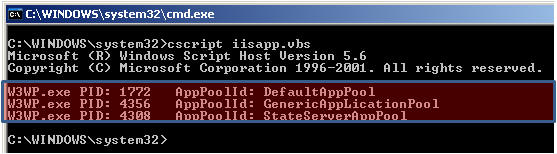
So, here is your list of all worker process with corresponding application pool name. From the Application pool name you can easily identify which worker process is related with your application.
Identify Worker Process in IIS 7.0
From IIS 7.0 you need you to run IIS Command Tool ( appcmd ) .
• Start > Run > Cmd
• Go To Windows > System32 > Inetsrv
• Run appcmd list wp