Don’t Waste Your Data – Insights Driven Business

Become an Insights-Driven Business

I recently watched an interview of Boris Evelson VP, Principal Analyst,  Forrester by Microsoft Technical Fellow Amir Netz about insights driven business. I’ve highlighted some of the points made during the conversation below.

Per research by Forrester, insight driven firms are expected to grow 8x to 10x faster than the global economy. Not 8%, but 8x faster.

Grow 8x to 10x faster than the global economy.

Insight Driven Firms:

  • Have Better Risk avoidance
  • More likely to uncover new revenue streams
  • Reduced IT costs
  • Have Better Security

Insight is not just data. And insights need to change behavior. The flow is in this direction: data builds signals, the signals then turn into insights, the insights trigger actions, which bring business outcomes.

What makes an organization insight driven:

  • Strategic investments in technology
    • Data, signals and insights
  • Collection and implementation
    • Cross functional insight teams
  • Operating model
    • Insights come first before action
  • Actionable
  • Continuous learning

Amir from Microsoft mentioned that everywhere within the organization they are finding 95% of MS employees use BI daily. Power BI is used as often as PowerPoint in meetings these days.

Some Power Platform Specific Points

Good BI provides a Semantic Model of the business – insight that uses the company’s jargon.

The Power Platform has 3 components that interact with each other:

Power BI now allows the embedding of PowerApps within reports allowing for what if scenarios to be easily interactive. Analyze the date, modify predictions and forecasts and see how the analysis changes immediately. Flow (Power Automate) allows for the automation of Power BI and PowerApps to be updated by external events.

They introduced to me the idea of Augmented BI

  • Machine Learning for data modeling and preparation
  • Natural language queries and generation
  • Addressing Knowledge Gaps automatically with ML
  • Unstructured data – ML can extract insights

Investing in AI and Machine Learning (ML) regarding BI is profitable.

There is a new Decomposition Tree preview feature in Power BI allowing AI to guide your drill down decisions. Leading you to the areas of the business to look at.

I encourage you to watch the interview for yourself.


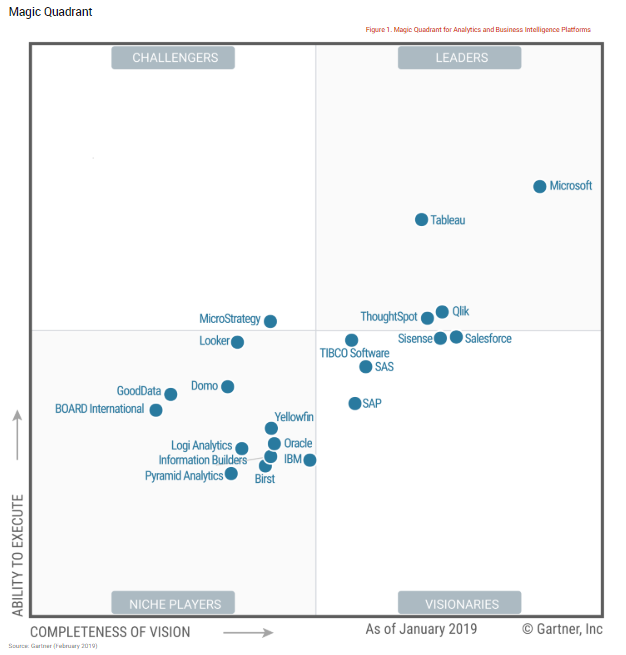
Gartner Report – Power BI is Magic Quadrant Leader

Gartner Report - BI Magic Quadrant
Gartner Report – BI Magic Quadrant

I recently read this Gartner report which identifies Power BI as the Business Intelligence leader above Tableau, Qlik, Domo and ThoughtSpot based on:

  • Agile, centralized BI provisioning
  • Decentralized analytics
  • Governed data discovery
  • Embedded analytics
  • Extranet deployment

I found their deeper focus on various data source connectivity options, data storage and loading, augmented data discovery, natural language query, mobile and sharing to be spot on with what I find in the field.

What surprised me is iDashboards didn’t make the study and Domo is classified as a niche player.

Finally, the Identified strengths of Power BI:

  • Low price with positive sales experience
  • Ease of use for complex types of analysis
  • Comprehensive product vision

CEO Exec Forum – Office 365 and Power BI

Recently I gave 2 presentations to the CEO Executive Forum at their semi-annual meeting; this time located in Detroit. The first was on Connectivity and Collaboration, the 2nd on Metrics, Reports and Dashboards. These focus on Office 365 and Power BI, including SharePoint and middleware.

Connectivity and Collaboration

For Connectivity and Collaboration, we focused on how as humans we need to make connections between things, and between things and people. I then described some ways this is possible with Office 365, SharePoint, OneNote and Teams and middleware.

We worked on answering questions like:

Can we automate our business processes in Office 365?
What is the best way to manage documents?
How do I reduce data entry?

Metrics, Reports and Dashboards

During Metrics, Reports and Dashboards I took time to focus on the difference types of numbers to pay attention to, compared metrics to KPI’s and talked about what a dashboard should contain. There was some demonstrations including Power BI.

We worked on these questions:

What business metrics do I care about?
What numbers should I pay attention to?

I want to make the PowerPoint presentations available to the attendees of the conference and anyone else that finds the topics interesting.

Below are the 2 PowerPoint presentations you can download:

Connectivity and Collaboration

Metrics, Reports and Dashboards

Feel free to email or comment with questions or feedback.

Dynamic Excel CUBEVALUE and CUBEMEMBER Functions

We recently ran into a situation where a client needed to change the filter in an Excel report that is using the CUBEVALUE and CUBEMEMBER functions. The report was built using a pivot table going against a cube. We then used Convert to Formulas so we could control the report format. This approach worked great for the current data, but lacked a simple way to update the report every month by selecting a new period from a drop down. After some struggles and some seemingly dead ends, we had enough information to solve the problem. Continue reading “Dynamic Excel CUBEVALUE and CUBEMEMBER Functions”

SharePoint, PowerPivot, Power View and Multidimensional Analysis Services

This article was written to help me sort out SharePoint, PowerPivot, Power View and Analysis Services. Read on to discover the questions that arose as I embraced this technology set and the answers I’ve uncovered.

So what are the options for working with Power View within SharePoint with MDX as the source cube? Let me frame this a bit, I am referring to SharePoint 2013 and SQL Server 2012 SP 1 or SQL Server 2014. It appears that PowerPivot becomes the data source for Power View reports. That is, a PowerPivot workbook saved within a Document Library. So it seems feasible that building a PowerPivot report pulling from an MDX cube, then stored in a Doc Library should work. The first test is the Document Library, PowerPivot and MDX cube test. If this works the same way as using a tabular cube, then we are one step closer to a complete solution.

Continue reading “SharePoint, PowerPivot, Power View and Multidimensional Analysis Services”